busdayaxis
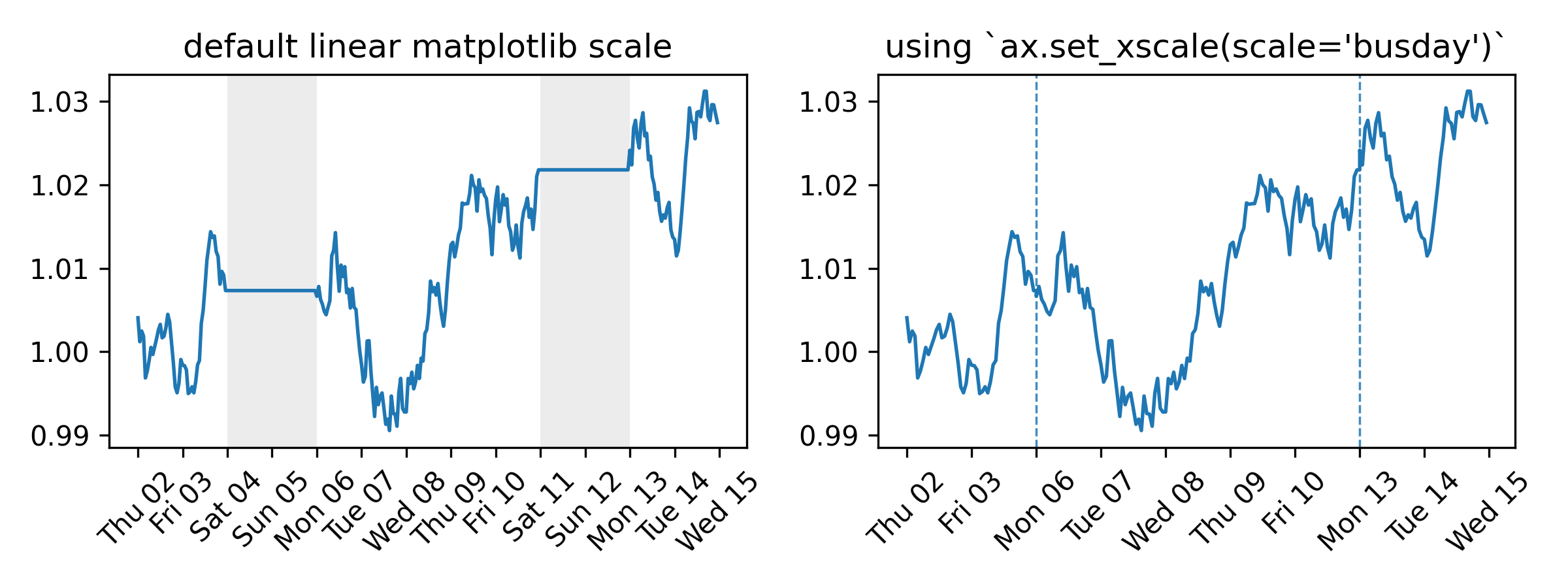
A Matplotlib scale that compresses non-business days and off-hours. Every visible unit on the axis corresponds to active time — no gaps for weekends, holidays, or overnight periods. No data preprocessing needed.
Full documentation at saemeon.github.io/busdayaxis
Installation
pip install busdayaxis
Quick Start
import matplotlib.pyplot as plt
import pandas as pd
import busdayaxis

dates = pd.date_range("2026-01-01", periods=10, freq="B")
values = range(len(dates))

fig, ax = plt.subplots()
ax.plot(dates, values)
ax.set_xscale("busday", bushours=(9, 17))  # compress weekends (Mon–Fri default) and off-hours (business hours: 09:00–17:00)
plt.show()
Why
Time series that only evolve on business days — prices, signals, operational metrics — look distorted on a standard calendar axis. Weekends and holidays introduce flat gaps that compress active periods and visually skew slopes. busdayaxis removes these gaps entirely.
What it provides
-
Compress weekends, holidays, and overnight gaps by adding an
axis scalewith a single call:ax.set_xscale("busday", weekmask=..., holidays=..., busdaycal=..., bushours=...)-
weekmask,holidays,busdaycal: standardnumpy.is_busdayparameters to configure which days are considered business days -
bushours: define uniform or weekday-specific business hours; supports multiple intervals per day (e.g. to collapse a lunch break) -
Implemented as a proper
matplotlib.scale— autoscaling, shared axes, and all standard artists work without any changes to your plotting code
-
-
Business-day-aware
DateLocatorwrappers for all standardmatplotlib.dateslocators — automatically filter out ticks on off-days and off-hours -
BusdayLocatorbase class to wrap any custom or third-party date locator with the same business-day filtering logic -
MidBusdayLocatorto place a tick at the midpoint of each business session, useful for centering day labels -
mark_gapsto draw visual indicators (vlines or broken-axis slash marks) at every session boundary on a busday axis -
holidays_from_exchangeto build theholidays=list automatically from anyexchange_calendarsorpandas_market_calendarscalendar object
Under the Hood
-
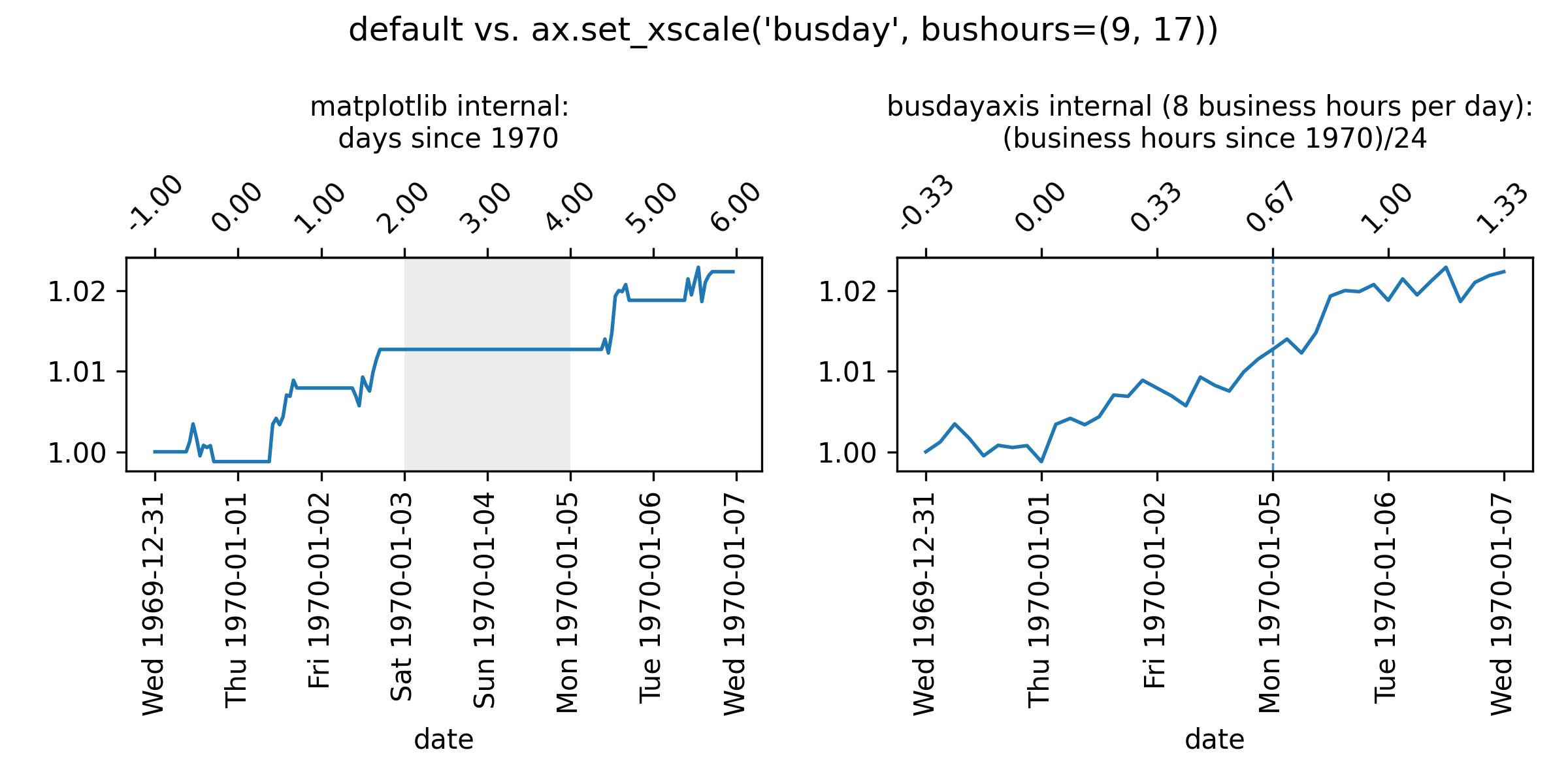
matplotlibinternally handles dates as floating-point numbers representing days since 1970-01-01, or stated alternatively, as $$ \text{matplotlib-representation} = \frac{\text{hours since 1970-01-01}}{24 \text{hours}} $$ -
busdayaxistransforms these coordinates to floating-point numbers representing $$ \text{busdayaxis-representation} = \frac{\text{business-hours since 1970-01-01}}{24 \text{ hours}} $$This conversion implies that datetime values that fall on non-business days or outside of business hours will be mapped to the same coordinate as the nearest preceding business hour. For example, if business hours are defined as 9:00 to 17:00, then "1970-01-05 08:00" (Mon 08:00) is mapped to the same coordinate as "1970-01-05 09:00" (Mon 09:00), because the earlier timestamp lies outside the defined business hours.
Example: "1970-01-05 10:00" (Mon 10:00)
-
Matplotlib representation (all hours counted):
Thu 1970-01-01 24h (00:00 - 24:00) + Fri 1970-01-02 24h (00:00 - 24:00) + Sat 1970-01-03 24h (00:00 - 24:00) + Sun 1970-01-04 24h (00:00 - 24:00) + Mon 1970-01-05 10h (00:00 - 10:00) --------------------------------------- = 106h (Total hours since epoch) / 24h --------------------------------------- = 4.41666... (matplotlib coordinate) -
Busdayaxis representation:
- We assume here that business hours are from 9:00 to 17:00. This can be configured by setting
ax.set_xscale("busday", bushours=(9, 17)).
To get the floating-point representation of "1970-01-05 10:00" (Mon 10:00), we count the business hours that have elapsed since 1970-01-01 00:00:
Thu 1970-01-01 8h (9:00 - 17:00) + Fri 1970-01-02 8h (9:00 - 17:00) + Sat 1970-01-03 0h + Sun 1970-01-04 0h + Mon 1970-01-05 1h (09:00 - 10:00) --------------------------------------- = 17h (business hours since epoch) / 24h --------------------------------------- = 0.708333... (busdayaxis coordinate) - We assume here that business hours are from 9:00 to 17:00. This can be configured by setting
Usage
There are two equivalent ways to apply the scale:
String-based
Pass the registered name "busday" to set_xscale along with keyword arguments taken by BusdayScale. The axis parameter is excluded as it is automatically provided by the ax.set_xscale() call.
import datetime
import matplotlib.pyplot as plt
import busdayaxis  # scale is registered automatically on import

fig, ax = plt.subplots()
ax.plot(dates, values)

ax.set_xscale("busday")  # compress weekends (Mon–Fri default)
# or
ax.set_xscale("busday", bushours=(9, 17))           # numeric hours
ax.set_xscale("busday", bushours=("09:00", "17:00"))  # ISO time strings
ax.set_xscale("busday", bushours=(datetime.time(9), datetime.time(17)))  # datetime.time
# or — multiple intervals (e.g. collapse a lunch break)
ax.set_xscale("busday", bushours=[(9, 12), (13, 17)])
# or
ax.set_xscale(  # per-day business hours
    "busday", bushours={"Mon": [(9, 12), (13, 17)], "Fri": (9, 13)}
)
# or
ax.set_xscale(  # custom week mask and holidays
    "busday",
    weekmask="Sun Mon Tue Wed Thu",
    holidays=["2025-01-01"]
)
Class-based
Instantiate BusdayScale directly and pass it to set_xscale. The class is
fully typed, so IDEs provide parameter completion and inline documentation.
from busdayaxis import BusdayScale

ax.set_xscale(BusdayScale(ax.xaxis))  # compress weekends (Mon–Fri default)
# or
ax.set_xscale(BusdayScale(ax.xaxis, bushours=(9, 17)))  # single session, all days
# or
ax.set_xscale(BusdayScale(ax.xaxis, bushours=[(9, 12), (13, 17)]))  # morning + afternoon
# or
ax.set_xscale(  # per-day business hours, with a lunch break on Mondays
    BusdayScale(ax.xaxis, bushours={"Mon": [(9, 12), (13, 17)], "Fri": (9, 13)})
)
# or
ax.set_xscale(  # custom week mask and holidays
    BusdayScale(ax.xaxis, weekmask="Sun Mon Tue Wed Thu", holidays=["2025-01-01"])
)
The default BusdayScale(ax.xaxis) is equivalent to ax.set_xscale("busday"): both compress Saturdays and Sundays while leaving all other time visible.
Custom tick placement
busdayaxis provides business-day-aware wrappers for every standard Matplotlib date locator. Each wrapper delegates tick placement to the underlying locator and then filters out any ticks that fall on non-business days or outside active business hours.
busdayaxis locator |
Wraps |
|---|---|
AutoDateLocator |
mdates.AutoDateLocator |
WeekdayLocator |
mdates.WeekdayLocator |
DayLocator |
mdates.DayLocator |
HourLocator |
mdates.HourLocator |
MinuteLocator |
mdates.MinuteLocator |
SecondLocator |
mdates.SecondLocator |
MicrosecondLocator |
mdates.MicrosecondLocator |
MidBusdayLocator |
(custom — see below) |
All locators read the weekmask, holidays, and bushours configuration directly from the axis, so they automatically stay in sync with the active BusdayScale.
You can also wrap any third-party or custom locator with the base BusdayLocator:
import matplotlib.dates as mdates
import busdayaxis

ax.set_xscale("busday", bushours=(9, 17))

# Hourly ticks only within business hours
ax.xaxis.set_major_locator(busdayaxis.HourLocator())

# Every other business day
ax.xaxis.set_major_locator(busdayaxis.DayLocator(interval=2))

# Every Monday that is a business day
ax.xaxis.set_major_locator(busdayaxis.WeekdayLocator(byweekday=mdates.MO))

# Wrap a custom locator
ax.xaxis.set_major_locator(busdayaxis.BusdayLocator(my_custom_locator))
MidBusdayLocator
MidBusdayLocator is a special locator that places one tick at the midpoint of the business session for each business day. It is not a filter wrapper — it computes midpoints directly from the bushours configuration, including per-day schedules.
Its primary use is centering day labels inside each session:
ax.set_xscale("busday", bushours=(9, 17))

# Major ticks at session boundaries, minor ticks centred for day labels
ax.xaxis.set_minor_locator(busdayaxis.MidBusdayLocator())
ax.xaxis.set_minor_formatter(mdates.DateFormatter("%a"))
Marking gap boundaries
mark_gaps draws a visual indicator at every point where the axis collapses a gap — end of session, overnight, weekend, or holiday. Three styles are available:
busdayaxis.mark_gaps(ax)                        # "vline": thin dashed vertical line (default)
busdayaxis.mark_gaps(ax, style="broken")        # diagonal slash marks at top and bottom
busdayaxis.mark_gaps(ax, style="both")          # vline + slash marks combined
busdayaxis.mark_gaps(ax, color="steelblue", alpha=0.4)  # keyword args forwarded to artists
Holidays from an exchange calendar
holidays_from_exchange extracts the holidays= list from any exchange_calendars or pandas_market_calendars calendar object — no manual date maintenance needed:
import pandas_market_calendars as mcal   # or: import exchange_calendars as xcals
import busdayaxis

cal = mcal.get_calendar("NYSE")          # or: xcals.get_calendar("XNYS")
holidays = busdayaxis.holidays_from_exchange(cal, "2025-01-01", "2025-12-31")
ax.set_xscale("busday", holidays=holidays)
License
MIT